
What is ERA in Medical Billing
An Electronic Remittance Advice (ERA) is an electronic file (EDI 835) sent by insurance payers to healthcare providers that explains how claims were processed, including payments, denials, adjustments, and patient responsibility amounts.
ERA enables automated payment posting, reduces manual errors, and improves revenue cycle efficiency.
Healthcare providers submit claims to insurance payers for reimbursement. After processing, the payer sends a detailed breakdown of how the claim was handled.
This breakdown is called an Electronic Remittance Advice (ERA).
ERA provides clear information about:
– Payment amounts
– Claim approvals or denials
– Adjustment reasons
– Patient financial responsibility
Understanding ERA is essential for accurate payment posting, denial management, and revenue cycle optimization.
What Is an Electronic Remittance Advice (ERA)?
An ERA is an electronic file from a health plan that explains how it processed your claim payments. Think of it as the digital version of an Explanation of Benefits (EOB) or paper remittance advice.
One ERA file usually covers multiple claims, not just one. The file tells you:
- Which claims got paid
- Which claims got denied or adjusted
- How much was paid for each
- Why were amounts reduced (contractual write-offs, deductibles, coinsurance)
- What adjustments were made and why
The ERA uses standard codes for everything—no more deciphering payer-specific nonsense. Under HIPAA, every payer has to use the same code sets.
ERA vs EOB: What’s the Difference?
Electronic Remittance Advice (ERA) and Explanation of Benefits (EOB) both describe how claims are processed, but they serve different purposes.
- ERA (835 file) is an electronic, machine-readable format used for automated payment posting within billing systems
- EOB is typically a paper or PDF document intended for manual review by providers and patients
While both contain similar payment and adjustment information, ERA enables faster processing, improved accuracy, and seamless integration with practice management systems.
ERA File Structure (835 Format Explained)
An ERA follows a standardized structure defined by ANSI X12 (835 transaction). It includes three main sections:
1. Header
Contains payer and provider information, payment method, and trace number.
2. Detail Section
Includes claim-level data such as:
– Paid amounts
– Denials
– Adjustments
– Patient responsibility
3. Trailer
Summarizes total payments, adjustments, and balancing information.
Each section is divided into segments that ensure consistency across all payers.
The Three Code Sets You Need to Know
When you open an ERA file, you will see three types of codes. They work together to tell the complete story of why you got paid what you got paid.
Claim Adjustment Group Codes (Group Codes)
These assign financial responsibility for unpaid amounts.
| Group Code | What It Means | Who Pays |
| CO | Contractual Obligation | Provider writes it off |
| PR | Patient Responsibility | Patient owes this amount |
| OA | Other Adjustment | Varies by situation |
| PI | Payer-Initiated Reduction | Payer takes it back |
Here is a hard rule from CMS. You can only bill the patient when the Group Code PR is used. If you see CO and bill the patient anyway, you are violating your payer contract.
Claim Adjustment Reason Codes (CARCs)
These provide the specific reason for an adjustment. For example, CARC 45 is “Charge exceeds fee schedule/maximum allowable or contracted/legislated fee arrangement.” CARC 97 is “The benefit for this service is included in the payment for another service.”
Remittance Advice Remark Codes (RARCs)
These add more detail when a CARC is not specific enough. RARCs are like footnotes. They give context. “This service was not covered because the patient was out of network” would be a RARC clarifying a denial.
If you want to request new codes or changes to existing ones, you can. The CARC Committee reviews requests three times per year. The RARC Committee meets every month.
How to Read an ERA File (Step-by-Step)
Reading an ERA correctly ensures accurate payment posting and reconciliation.
Follow these steps:
1. Identify the total payment amount and trace number (TRN)
2. Review each claim’s status (paid, denied, or adjusted)
3. Analyze adjustment codes (CARC and RARC)
4. Check Group Codes to determine financial responsibility
5. Match ERA data with the corresponding EFT deposit
Proper ERA interpretation helps reduce errors, prevent revenue leakage, and improve billing accuracy.
ERA Workflow in Medical Billing
ERA is part of a structured revenue cycle workflow that connects claim processing, payment, and reconciliation.
- Claim is submitted to the payer (EDI 837 transaction)
- Payer processes the claim and determines payment
- ERA (EDI 835 file) is generated
- EFT payment is issued to the provider’s bank account
- ERA is received via the clearinghouse or directly into the system
- Payments and adjustments are automatically posted
This workflow ensures accurate reconciliation between payments and claim processing.
ERA vs. Paper Remittance
CMS lists several advantages of ERA over paper, and they are not small advantages.
- Speed: Electronic remittances post to your system automatically. Paper remittances require someone to manually key in the data. Which one sounds like a better use of your staff’s time?
- Accuracy: Manual entry introduces typos. ERAs do not. The data comes in exactly as the payer sent it.
- Detail: ERAs generally contain more detailed information than the paper version. Payers can pack more data into an electronic file than they can fit on a printed page.
- Searchability: Molina Healthcare points out that with ERA, you can search for historical remittances by claim number, member name, or date. Try doing that with a stack of paper EOBs.
- Storage: Paper takes up physical space. ERAs live on your server or in the cloud.
Benefits of ERA for Healthcare Providers
Using ERA improves both operational efficiency and financial performance in medical billing.
- Faster payment posting through automation
- Reduced manual data entry and human error
- Improved accuracy in claim reconciliation
- Better tracking of claim adjustments and denials
- Lower administrative costs
- Enhanced revenue cycle visibility
ERA allows billing teams to focus on resolving complex issues rather than manual processing tasks.
How Fast Is ERA Processing?
Fast. Molina Healthcare reports that providers using ERA can get payment in as little as five days from claim submission. That is not a typo. Five days.
Paper remittances? You are waiting for the check to be printed, mailed, delivered, opened, and manually processed. That is two to four weeks minimum.
How Fast Is ERA Processing?
ERA is used across the healthcare ecosystem by multiple entities involved in revenue cycle management.
- Physician practices and clinics
- Hospitals and healthcare systems
- Medical billing companies
- Clearinghouses and revenue cycle vendors
- Insurance payers and health plans
Each entity relies on ERA to ensure accurate payment processing and financial reconciliation.
How to Enroll for ERA?
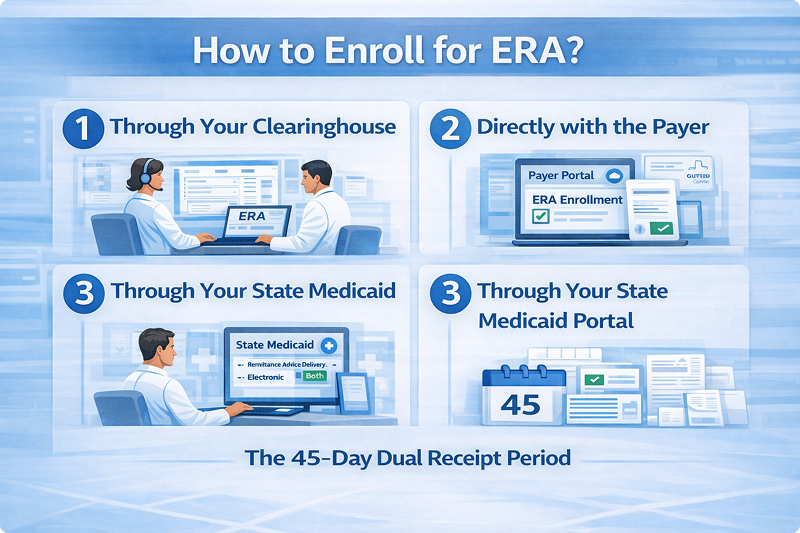
The enrollment process varies by payer, but the pattern is consistent.
Option 1: Through your clearinghouse
If you already use a clearinghouse to submit claims, contact them first. They can usually handle ERA enrollment for you. This is the easiest path because your clearinghouse already has your provider information on file.
Option 2: Directly with the payer
Most payers have an online enrollment portal. For example, Sanford Health Plan uses the E-Payment Center for ERA enrollment. You fill out a form, agree to their trading partner agreement, and they set you up.
Option 3: Through your state Medicaid portal
For Medicaid, you can often enroll during provider enrollment or later from your provider home page. Select “Electronic” or “Both” when asked about remittance advice delivery.
The 45-day dual receipt period
Here is something most people do not know. When you first enroll in ERA, payers typically send you both the electronic file AND the paper remittance for about 45 days. This gives you a safety net while you test your electronic posting process. After that window closes, the paper stops. You are all electronic.
What Happens When an ERA Arrives?
The ERA file comes to your clearinghouse or directly to your practice management system. Then the posting process begins.
First, the system matches the ERA with the corresponding EFT (electronic funds transfer) deposit. This matching uses a TRN segment that is supposed to be identical in both the payment file and the remittance file. Same number. Same format. That is how the system knows which remittance goes with which deposit.
Then, the system attempts to automatically post each payment to the correct claim.
When it works smoothly, you never touch anything. The payment posts. The adjustments apply. The patient balance updates. Done.
When it does not work smoothly, you have problems.
When ERA Posting Goes Wrong
ERA posting errors often originate from mismatches between claim data, payer processing rules, and EDI formatting. Common issues include 835 file balancing errors, incorrect adjustment codes, and missing claim identifiers.
These issues can disrupt reconciliation and delay revenue cycle processes if not resolved systematically.
The file does not balance
Sometimes the total payment amount in the file does not match the sum of the individual claim adjustments. This is called an “out-of-balance” remittance. When this happens, your system cannot post the payments because the math does not work.
NC Tracks, North Carolina’s Medicaid system, had exactly this issue in early 2026. The actual deposits were correct, but the 835 files explaining those deposits were wrong. They had to regenerate every affected file.
What do you do? Do not force the posting. Flag the file. Contact the payer. Get a corrected file.
The claim does not match
Sometimes the ERA arrives, but your system cannot find the original claim to post the payment against. This becomes a “no matching charge” record. Someone has to manually search for the claim and match it up.
Negative claim activity
Recoupments, voids, reversals, takebacks. These are all negative adjustments where the payer takes money back. These transactions are common but tricky. If the ERA miscalculates them, your entire file goes out of balance.
Free Tools from CMS
Not every practice has a high-end practice management system that can automatically post ERAs. If yours cannot, CMS has you covered.
CMS offers free software to read and print ERAs.
- PC Print – For institutional providers (hospitals, facilities)
- Medicare Easy Print (MREP) – For professional providers (physicians, clinics)
These tools let you view and print an ERA in a readable format. MREP also lets you export reports to Excel.
If you use Medicare’s free billing software PC-ACE, you already have ERA viewing built in.
ERA and EFT: How They Work Together
Electronic Remittance Advice (ERA) and Electronic Funds Transfer (EFT) are complementary components of the payment process.
- EFT transfers funds from the payer to the provider’s bank account
- ERA (835 file) explains how those funds should be applied to specific claims
These transactions are linked using the TRN (Trace Number) segment, ensuring accurate matching between payment and remittance.
Without ERA, providers receive payments without clear claim-level details. Without EFT, providers receive remittance data but must wait for paper checks.
ERA Posting Process in Medical Billing
ERA posting follows a structured workflow:
1. Receive ERA file from clearinghouse or payer
2. Match ERA with EFT deposit using trace number
3. Import ERA into billing system
4. Automatically post payments and adjustments
5. Review exceptions or unmatched claims
6. Reconcile accounts and finalize posting
Automated ERA posting reduces manual workload and increases accuracy in revenue cycle management.
Why Some Payers Still Struggle with ERA?
You would think every payer would offer ERA by now. They do not. Or if they do, the adoption rate is terrible in some sectors.
Take workers’ compensation insurance. Fewer than 20% of workers’ comp claims use 835 ERA files. That is not a typo. Eighty percent are still paper.
The Council for Affordable Quality Healthcare estimates that broader ERA adoption could save the healthcare industry $20 billion in administrative waste. Twenty. Billion. Dollars.
Some of that is payer inertia. Some is state regulatory complexity. But the bottom line is the same. If your payer does not offer ERA, ask them why. If enough providers ask, they eventually change.
How to Start the ERA Posting Process in Your System?
Once the file arrives, you have to actually import it. The process varies by software, but the pattern is the same.
- Go to your ERA posting or import function
- Select whether you are importing a single file or multiple files from a directory
- Select the file(s)
- Run the import
Your system will generate an import report showing what succeeded and what failed. A new batch gets created for each check number.
If your computer crashes during the import, do not panic. The batch does not get created until all transactions have been processed. Just start over.
What to Do When an ERA Is Wrong
Payers make mistakes. ERAs can be wrong even when the deposit amount is correct.
Step one: Compare the ERA to the actual deposit in your bank account. If the numbers do not match, do not post.
Step two: Contact the payer. Ask for a corrected ERA. Most payers can regenerate and resend.
Step three: If you already posted from a bad ERA, reverse the posting. Then post from the corrected file.
Do not ignore discrepancies. They do not fix themselves. And they will mess up your end-of-month reconciliation.
Example of ERA in Medical Billing
A provider submits a claim for $500.
The ERA shows:
– Paid amount: $350
– Adjustment: $100 (Contractual Obligation – CO)
– Patient responsibility: $50 (PR)
This breakdown helps providers understand how payments are calculated and what amount can be billed to the patient.
Need Help Managing ERA Posting and Reconciliation?
ERA processing errors, reconciliation issues, and posting delays can significantly impact your revenue cycle performance.
Medhasty Medical Billing Services helps healthcare providers streamline ERA workflows, resolve posting discrepancies, and improve payment accuracy.
Request a free billing audit and identify hidden inefficiencies in your payment process.
The Bottom Line
ERA is not optional anymore. It is the standard. CMS mandates it. HIPAA requires it. And your competitors are already using it to post payments faster and with fewer staff hours.
If you are still on paper remittances, you are losing money on administrative costs alone. Not to mention the delay in getting paid.
Get enrolled. Set up your posting process. Use the free CMS tools if you need them. And if your payer does not offer ERA, ask them when they will.
The money is out there. ERA just helps you find it faster.
Frequently Asked Questions (FAQs)
What is ERA in medical billing?
Electronic Remittance Advice (ERA) is an electronic file (EDI 835) that explains how insurance claims were processed, including payments, denials, and adjustments.
What is an ERA 835 file?
An ERA 835 file is a standardized electronic transaction used by payers to send payment and claim adjustment details to healthcare providers.
What is the difference between ERA and EOB?
ERA is an electronic, machine-readable file used for automated payment posting, while EOB (Explanation of Benefits) is a paper or PDF document for manual review.
How does ERA work in medical billing?
ERA works by providing detailed claim payment data from payers, which is automatically imported into billing systems for payment posting and reconciliation.
How do you read an ERA file?
To read an ERA file, review payment amounts, claim status, adjustment codes (CARC, RARC), group codes, and match the data with EFT deposits.
What are CARC and RARC codes in ERA?
CARC (Claim Adjustment Reason Codes) explain why a claim was adjusted, while RARC (Remittance Advice Remark Codes) provide additional details about the adjustment.
What is ERA payment posting?
ERA payment posting is the automated process of applying payments, adjustments, and patient balances to claims using ERA data.
What are common ERA errors?
Common ERA errors include out-of-balance files, missing claims, incorrect adjustment codes, and negative adjustments like recoupments.
How do providers enroll for ERA?
Providers can enroll for ERA through a clearinghouse, directly with payers, or via state Medicaid portals.
Why is ERA important in medical billing?
ERA improves efficiency by automating payment posting, reducing manual errors, speeding up reimbursements, and enhancing revenue cycle management.