

What Is a Claim Rejection in Medical Billing?
A claim rejection in medical billing occurs when a submitted claim fails validation checks and is returned before being processed by the insurance payer. This usually happens due to errors such as missing patient information, invalid codes, incorrect payer details, or formatting issues.
Unlike claim denials, rejected claims never enter the payer’s adjudication system and must be corrected and resubmitted before payment can be considered.
Introduction
Claim rejections are a pain. They slow down your cash flow, waste your staff’s time, and mess with your numbers.
But here is the thing most people get wrong. They lump rejections and denials together like they are the same problem. They are not. And if you treat them the same way, you are going to keep losing money.
This guide walks through what rejections are, why they happen, and how to stop them before they ever hit your workflow.
What Is a Claim Rejection? (And How It Differs from a Denial)
This is where most billing staff get tripped up. A rejection and a denial sound similar, but they happen at completely different stages of the process.
Claim Rejection
A claim is rejected before the payer even looks at it. The claim never enters the payer’s system as a legitimate billable claim.
Why?
Your claim failed basic formatting or data requirements. This is like trying to board a flight without a valid ID. You do not even get to the gate. The airline turns you away immediately.
Rejections come from things like:
- Missing patient information
- Invalid procedure codes
- Formatting errors
- Wrong payer ID
The good news?
You can fix a rejection and resubmit it.
The bad news?
Every rejection adds days or weeks to your payment timeline.
Claim Denial
A denial is different. The payer accepted your claim, processed it, reviewed it, and then said “no”. The claim made it through the front door, got looked at, and was refused.
Denials occur when the payer determines that the service is not covered, is not medically necessary, or does not meet their policy requirements.
Here is the critical difference. You cannot just fix a denial and resubmit it. You have to file an appeal. And appeals require documentation, clinical justification, and often multiple rounds of back-and-forth.
Rejections vs. Denials: A Quick Comparison
| Rejection | Denial | |
| When discovered | Before processing | After processing |
| Claim status | Never entered payer system | Entered and reviewed |
| Typical causes | Missing data, invalid codes, formatting errors | Not covered, no auth, medical necessity |
| Payer response | Claim returned; no payment considered | EOB/ERA with denial code |
| Fixing it | Correct and resubmit | Appeal with documentation |
| Time pressure | Must be fixed and resubmitted before timely filing deadline | Appeal deadlines vary by payer (60-180 days) |
| Success rate | High, if error is fixed correctly | Variable, depends on denial reason and documentation |
To better understand denial-related issues, read our complete guide on medical billing denial codes. Medical billing guidelines and claim validation rules are defined by organizations like the Centers for Medicare & Medicaid Services (CMS).
Key Entities Involved in Claim Rejections
Understanding claim rejections requires familiarity with the core systems and entities involved in the medical billing workflow.
Clearinghouse
A clearinghouse acts as an intermediary that checks claims for errors before sending them to the payer. It performs validation edits to ensure claims meet formatting and data requirements.
EDI Transactions (837, 277CA)
Electronic Data Interchange (EDI) enables claim transmission:
- 837 → Claim submission
- 277CA → Claim acknowledgment or rejection
These transaction standards are regulated under HIPAA electronic data exchange guidelines.
Explanation of Benefits (EOB) / ERA
These documents provide details about claim processing outcomes, including payments or denials.
CPT and ICD Codes
- CPT → Procedures performed
- ICD-10 → Diagnosis justification
Incorrect pairing can trigger rejections.
Diagnosis coding follows ICD-10 guidelines established by healthcare authorities.
Revenue Cycle Management (RCM)
RCM is the financial process that manages claims from submission to payment. Rejections disrupt this cycle and delay revenue.
Why Claims Get Rejected: The Real Reasons
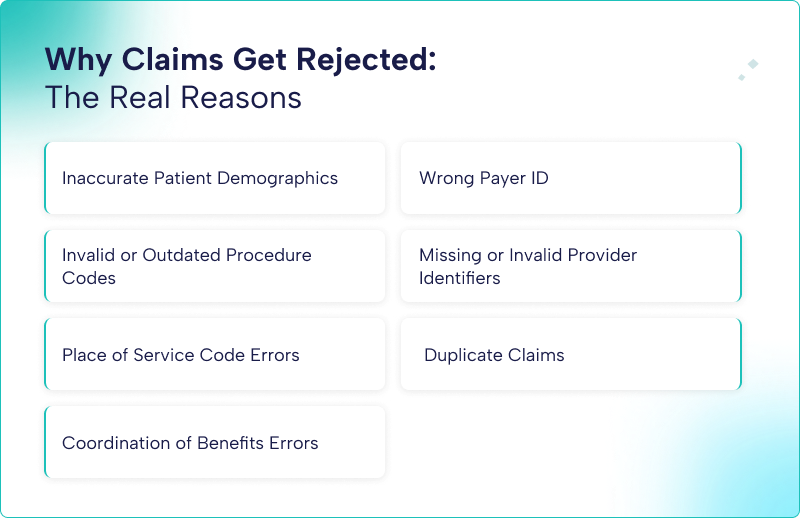
Let us look at what actually causes rejections. Not the theory. The actual, day-to-day screw-ups that stop your claims cold.
1. Inaccurate Patient Demographics
This is the number one killer of clean claims. A transposed digit in a birth date. A missing apartment number. A maiden name that does not match what the insurance company has on file.
Here is why this happens. Payer eligibility and EDI edits depend on exact field matches. Your system says the patient’s birthday is 04/15/1975. The payer’s system says 04/05/1975. That is a mismatch. The claim gets rejected instantly.
Fix this at the front desk. Verify patient information at every single visit. Not just the first one. People change jobs. They get divorced. They turn 65 and switch to Medicare. You need to catch those changes before your bill.
2. Wrong Payer ID
Each insurance company has a unique Payer ID. Usually a five-digit alphanumeric code. This tells the clearinghouse where to send the claim.
Use the wrong Payer ID, and your claim goes to the wrong place. Or it goes nowhere at all. The system rejects it because it does not recognize the destination.
Keep a current list of Payer IDs for every insurance company you bill. Update it every time you get a new contract or a payer changes their processing system.
3. Invalid or Outdated Procedure Codes
CPT and HCPCS codes change every year. New codes get added. Old codes get deleted. Some codes get revised.
If you bill a code that was deleted last year, your claim will be rejected. The payer’s system looks for that code in its valid code table. It is not there. Rejection.
Here is a concrete example. Medicare has specific frequency codes. If you submit a corrected claim without using the frequency code “7”, it gets rejected. That is a simple thing. But thousands of claims get rejected for exactly that reason every day.
CPT codes are maintained and updated annually by the American Medical Association (AMA).
4. Missing or Invalid Provider Identifiers
Your NPI needs to be on every claim. The rendering provider’s NPI needs to be there too. And they need to match what the payer has on file for your practice.
When a new provider joins your practice, their NPI needs to be enrolled with each payer before you bill under their name. Send a claim before that enrollment is active? Rejection.
Same thing with taxonomy codes. A taxonomy code tells the payer what kind of provider you are. If you bill a cardiology procedure but your taxonomy code says family practice, that claim is getting rejected.
5. Place of Service Code Errors
Place of Service codes are two-digit codes that tell the payer where the service happened. The office is 11. The inpatient hospital is 21. Telehealth has its own codes.
Use the wrong one, and your claim gets rejected. For example, submitting a telehealth visit under an office POS code triggers an automatic rejection because the payer’s system expects a different code for virtual visits.
6. Duplicate Claims
Submit the same claim twice, and the second one gets rejected as a duplicate. The payer’s system sees the same patient, same date of service, same procedure code, and says, “We already have this one.”
Here is where people mess up. They get a rejection for some other reason, fix it, and resubmit. But they forget to mark it as a corrected claim. The system sees what looks like a duplicate and rejects it again.
If you are resubmitting a corrected claim, you need to indicate that. For electronic claims, use frequency code “7”. For paper claims, check the “resubmission” box or indicate it in the appropriate field.
7. Coordination of Benefits Errors
When a patient has two insurance policies, you need to bill the primary payer first. Bill the secondary payer before the primary? Rejection. Bill is primary, but do not indicate that there is a secondary? Also, a problem.
This gets even messier when patients switch jobs or get divorced. The order of payers can change. You need to verify the correct primary payer at every visit.
Struggling with repeated claim rejections?
Our medical billing experts can identify root causes and fix systemic issues to improve your clean claim rate.
The Claim Rejection Workflow: Step by Step

Here is how rejections actually move through your system and what you need to do at each stage.
Step 1: Claim Submission
You send the claim. Either directly to the payer or through a clearinghouse. Most providers use a clearinghouse because it adds an extra layer of validation before the claim hits the payer.
Step 2: Clearinghouse Scrubbing
Before the clearinghouse forwards your claim, it runs a series of edits. It checks for missing fields. Invalid codes.
If the clearinghouse finds an error, it rejects the claim right there. You get a rejection report. You fix the error. You resubmit. The claim never goes to the payer.
This is actually a good thing. A clearinghouse rejection is easier to fix than a payer rejection because you catch it immediately.
Step 3: Payer Initial Validation
If the clearinghouse passes the claim, it goes to the payer. The payer runs their own validation. They check:
- Patient information matches their records
- Provider NPIs are active and enrolled
- Procedure codes are valid and current
- Date of service is within an acceptable range
If any of this fails, the payer sends back a rejection. This usually comes in the form of a 277CA transaction or a rejection report.
Step 4: Rejection Receipt and Logging
Your billing team receives the rejection. This needs to go into a tracking system immediately. Record:
- Claim number
- Patient name
- Date of service
- Rejection code and reason
- The date of rejection was received
Do not skip this step. Without tracking, you have no idea which claims need rework and which are still pending.
Step 5: Root Cause Analysis
Before you fix anything, figure out why the rejection happened. Was it a data entry error? A system mapping issue? A missing step in your front desk process?
If you just fix the one claim without understanding the root cause, the same error will happen again on the next claim. And the one after that.
Step 6: Correction and Resubmission
Fix the error. Update the patient’s demographic. Correct the procedure code. Add the missing modifier.
Then resubmit. Make sure you mark it as a corrected claim using frequency code “7”. Otherwise, it might get rejected as a duplicate.
Step 7: Verification
After resubmission, track the claim to make sure it gets accepted. Do not assume that fixing one error means there are no other errors. The claim could have had multiple problems. You might have fixed one but missed another.
Real-World Case Study: Claim Rejection Resolution
A clinic submitted a claim for an outpatient procedure, but the claim was rejected due to incorrect patient demographics.
Issue:
- Patient’s date of birth mismatch
- Clearinghouse rejection triggered
Action Taken:
- Verified patient information
- Updated records in the billing system
- Resubmitted the corrected claim
Outcome:
✔ Claim accepted on resubmission
✔ Payment received within standard cycle
This highlights how small front-end errors can disrupt the entire billing process.
Common Rejection Codes and What They Mean
Here are some rejection codes you will see frequently and what they actually mean.
| Rejection Code | What It Means | How to Fix |
| 0053 | Duplicate claim | Verify the procedure code is valid and appropriate for the diagnosis |
| 14 | Incorrect coding | Obtain authorization and resubmit with the auth number |
| 263 | Claim timeliness | Check timely filing limits. May be too late to resubmit |
| 0026 | Prior authorization required | Check that the date of service is valid and within allowable range |
| 7 | Invalid family or insuree | Verify patient insurance information is current and active |
| 9 | Invalid target date | Check that the date of service is valid and within the allowable range |
| 1 | Invalid item or service code | Verify procedure code exists and is current for the date of service |
The Cost of Rejections (And Why You Should Care)
Rejections cost you in three ways.
- Direct labor. Someone has to catch the rejection, research the error, fix it, and resubmit the claim. That takes time. The time you are paying for.
- Delayed cash flow. Every rejection adds days or weeks to your payment timeline. A clean claim might pay in 14 days. A rejected claim that gets resubmitted might take 45 days. That is a month of float you do not have.
- Write-offs. Not every rejected claim gets resubmitted. Some fall through the cracks. Some get resubmitted too late and miss the timely filing deadlines. Those claims become write-offs. Money you earned but never collected.
Industry data shows that average initial denial rates run between 11.8 percent and 20 percent. That means one out of every five to ten claims you submit gets denied or rejected. And about 65 percent of denied claims never get reworked.
If you submit 1,000 claims a month and 15 percent get rejected, that is 150 claims that need rework. If each one takes 15 minutes to fix, that is 37.5 hours of staff time. Every month. Just on rework.
How Claim Rejections Impact Your Revenue Cycle
Claim rejections do more than delay payments—they create compounding financial challenges across your practice.
Key Impacts:
- Increased AR Days
Rejected claims extend the time between service delivery and payment. - Higher Administrative Costs
Staff must spend additional time correcting and resubmitting claims. - Revenue Leakage
Some rejected claims are never resubmitted, resulting in permanent loss. - Cash Flow Disruption
Delayed payments affect operational stability and planning.
Practices with high rejection rates often experience reduced profitability and inefficiencies in their revenue cycle management.
How to Prevent Rejections Before They Happen
Prevention is cheaper than rework. Much cheaper. Here is how to stop rejections at the front end.
Verify Eligibility Before Every Appointment
Do not assume coverage is active just because the patient has an insurance card. Coverage changes. Policies terminate. People lose jobs.
Verify eligibility at least 48 to 72 hours before the appointment. Do it again at check-in. Things change fast. Use your practice management system’s eligibility tool or check directly on the payer portal.
Use Claim Scrubbing Software
Do not send a claim without scrubbing it first. Your clearinghouse probably offers scrubbing. Your practice management system might have it built in. Use it.
Scrubbing catches things like:
- Missing modifiers
- Invalid diagnosis-procedure code pairs
- Mismatched patient demographics
- Missing referral or authorization numbers
A good scrubber can catch 80 to 90 percent of common errors before the claim ever leaves your office.
Train Staff on Code Updates
CPT and HCPCS codes change every January. ICD-10 codes change every October. Your billing staff needs to know what changed and how it affects the codes you use.
Set up a training session every quarter. Go over new codes, deleted codes, and revised codes. Review payer-specific requirements for the codes you bill most often.
Standardize Front Desk Data Entry
Most rejections trace back to front desk errors. Wrong birth dates. Misspelled names. Incorrect insurance IDs.
Create a standardized check-in process. Verify two forms of ID. Scan the insurance card front and back. Have the patient confirm their demographic information at every visit.
Use dropdown menus instead of free text fields where possible. Limit the opportunity for typos.
Build a Denial and Rejection Log
Track every rejection and denial you receive. Include the reason code, the payer, the provider, and the date. Review this log monthly.
Look for patterns. Is one payer rejecting claims more often than others? Is one provider generating more rejections? Is a specific code getting rejected repeatedly?
Those patterns tell you where to focus your prevention efforts.
Use Real-Time Claim Edits
Most practice management systems let you build custom edits. Use them. Set up rules that flag claims before submission if certain conditions are not met.
For example, if a claim has a procedure code that requires prior authorization, set an edit that blocks submission until an authorization number is entered. If a claim is missing the referring provider NPI for a specialty visit, flag it.
These edits stop errors at the source instead of catching them after submission.
Quick Checklist to Reduce Claim Rejections
Use this checklist to minimize rejection rates:
- Verify patient eligibility before every visit
- Confirm the correct payer ID
- Validate ICD and CPT codes
- Ensure provider NPI is active and enrolled
- Apply the correct place of service codes
- Check for prior authorization requirements
- Run claims through scrubbing software
Following these steps can significantly improve your clean claim rate.
Final Word
Claim rejections are preventable. Not all of them. But most of them. The practices that have low rejection rates are not smarter than you. They just have better systems.
Verify eligibility before every visit. Scrub every claim before submission. Train your staff on code updates. Track your rejections and look for patterns. Fix the root cause, not just the one claim.
Do those things consistently, and your rejection rate will drop. Your staff will spend less time on rework. Your cash will flow faster. And you will stop losing money to claims that never should have been rejected in the first place.
Frequently Asked Questions (FAQs)
What is the difference between a rejection and a denial?
A rejection occurs before claim processing due to errors, while a denial happens after the payer reviews and refuses payment.
Can rejected claims be resubmitted?
Yes, rejected claims can be corrected and resubmitted, unlike denied claims, which require an appeal.
How quickly should rejected claims be fixed?
Rejected claims should be corrected and resubmitted immediately to avoid missing timely filing deadlines.
What is the main cause of claim rejections?
The most common cause is inaccurate patient demographic information.